 LayoutKeeper™ for Windows
Your windows, right where you left them.
Dock your laptop, restart for an update, plug in a monitor – and Windows piles everything onto one screen. LayoutKeeper puts every window back on the right monitor at the right size, and reopens the apps you'd closed.
One email when LayoutKeeper launches. No spam. $7 one-time, no subscription.
Sound familiar?
Windows forgets where your windows go. You end up doing its job, several times a day.
You dock your laptop in the morning and every window lands on the one small screen.
An update restarts your PC overnight, and the setup you'd carefully arranged is gone.
You spend the first ten minutes of the day reopening apps and dragging windows back.
Set it up once. Get it back any time.
LayoutKeeper sits quietly in the system tray and remembers exactly how you like your screens.
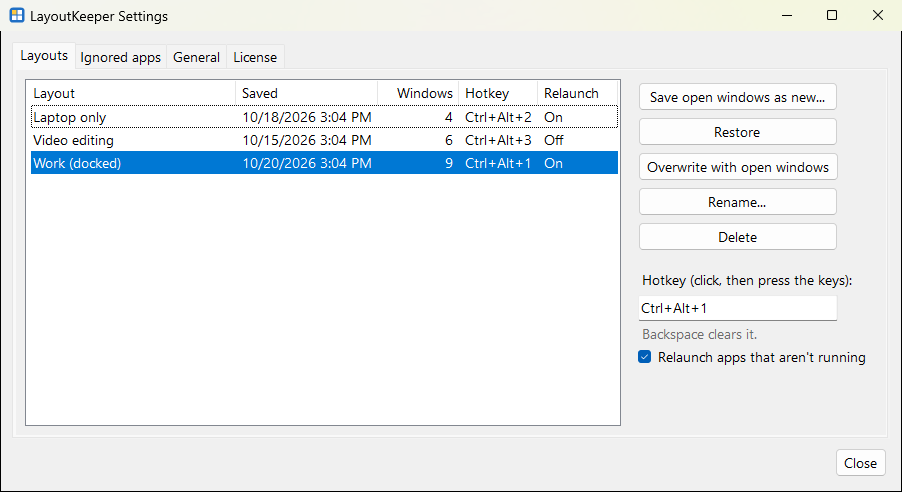
Save a layout in one click
Name it "Work" or "Editing". Every window's monitor, position, size and state is remembered.
Restore with one key
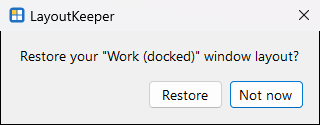
Pick it from the tray menu, or give each layout its own hotkey like Ctrl+Alt+1.
Dock your laptop. Everything goes back.
Plug in or unplug your monitors and LayoutKeeper restores the layout made for those screens by itself – or asks you first.
Reopens the apps you closed
Closed Outlook or Slack? LayoutKeeper starts them again and puts their windows where they belong.
Back after a restart
When you sign in, your layout comes back on its own – apps reopened, windows in place.
Private and light
No account, no cloud. Your layouts stay on your PC. Handles identical monitors, mixed resolutions and display scaling.
Simple on purpose
No zones to draw, no scripts to write. Just your layouts.
How it works
Three steps, about a minute.
Arrange your windows
Set up your screens the way you like to work.
Save the layout
Right-click the tray icon and choose "Save current layout".
Get it back
From the tray menu, with your hotkey, or automatically when your monitors change.
One price. Yours to keep.
- Use it on up to 3 of your PCs
- 14-day free trial – no card needed
- No subscription, no account
- Windows 10 and Windows 11
Questions
How is this different from Snap Layouts or PowerToys FancyZones?
Those snap windows into zones as you drag them, and tools that restore whole layouts usually wait for you to click. LayoutKeeper remembers where every window was and puts each one back by itself – when you dock, undock or restart – including apps you'd closed. No zones to draw, nothing to configure.
Does it work with apps from the Microsoft Store?
Yes, including Teams, WhatsApp and Spotify. A few built-in Windows apps, such as Calculator, can be moved but not yet reopened automatically.
Is there anything it can't do?
It doesn't reopen specific File Explorer folders or browser tabs, and Windows doesn't let it move the windows of apps running as administrator – it tells you when that happens.
I have a laptop and a desktop. Do I need two licenses?
No. One license covers up to three of your own PCs, and each keeps its own layouts for its own monitors.
Does it send my data anywhere?
No. Layouts and settings stay on your PC. The only thing LayoutKeeper sends is your license key, about once a week, to confirm it's valid.
When does it launch?
Soon. Leave your email below and we'll send one message on launch day.
Be first to know
One email when LayoutKeeper launches. That's it.